Companion app for AI smart glasses: phone-based control hub
HeyCyan, developed by Glasses Dev, is a companion app for AI-powered smart glasses that turns a smartphone into a device management hub. It links phones to wearables via Bluetooth, exposes an AI voice assistant activated by the wake word "Hey Cyan," and moves first-person media to the phone. Key functions include real-time translation in more than 30 languages, battery and network monitoring, remote camera control, and OTA firmware updates. Early adopters and content creators get most value.
How the app turns your phone into a glasses control hub
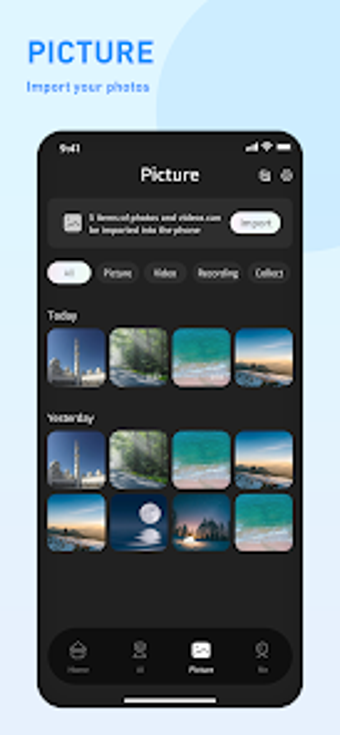
The app pairs with glasses over Bluetooth to centralize device management, offering remote camera control, resolution adjustment, and a Media Gallery for importing first-person photos and videos. It reports battery and network status for connected wearables and performs over-the-air system updates for glasses firmware. These capabilities make the phone the primary interface while the glasses remain hands-free during capture and assistant use.
How reliable are media sync and AI features in practice?
The gallery imports captured media and enables sharing, and the app provides real-time translation across more than 30 languages for immediate use while travelling. Reported user feedback is mixed: many users value the added AI features, while some users mention video synchronization issues and inconsistent voice-assistant responses. Those reports suggest variable reliability when transferring high-resolution video or depending on low-latency assistant replies.
Is it safe to apply updates and run the wake-word assistant?
The app issues over-the-air firmware updates and activates the assistant with a wake word, so it requires Bluetooth and network access and monitors device battery level during operation. Because OTA updates modify device software, apply updates with a stable connection and sufficient battery to reduce interruption risk. The permission model therefore reflects both continuous status monitoring and direct device control.
Do I need technical knowledge to set up and maintain it?
Pairing follows a guided flow: turn on the glasses, enable Bluetooth on the phone, open the app, and select Add Device, which lets non-technical users complete setup. Hands-free tasks use the wake word to reduce manual interaction. Advanced work such as changing camera resolution or initiating OTA firmware updates requires more attention, so users comfortable with occasional device maintenance get the most predictable results.
Practical recommendation for early adopters
HeyCyan is a solid option for early adopters of AI smart glasses who accept trade-offs between convenience and occasional instability in media sync or assistant accuracy. Expect to manage firmware updates and pairing steps; a practical tip is to apply OTA updates while the glasses are charging and keep the phone nearby during large media transfers to reduce sync errors. Recommended.